# Dynamic notes

{% hint style="info" %}
This feature it only available on one of our Business or Enterprise plans. Please speak to your account manager should you wish to upgrade or know more.&#x20;
{% endhint %}

Dynamic notes provide the ability to use portal variables and if, else, each and unless logic statements. Culminating in the ability to create a more personalised user experience without the effort of having to create many individual versions of the same note.&#x20;

<figure><img src="/files/NhrQpqYLiBHAPNxgn5g4" alt=""><figcaption><p>Using {{#if user.firstName ""}} Hi {{user.firstName}} {{else}} Hi there! {{/if}} allows you to create a personalise welcome to any note!</p></figcaption></figure>

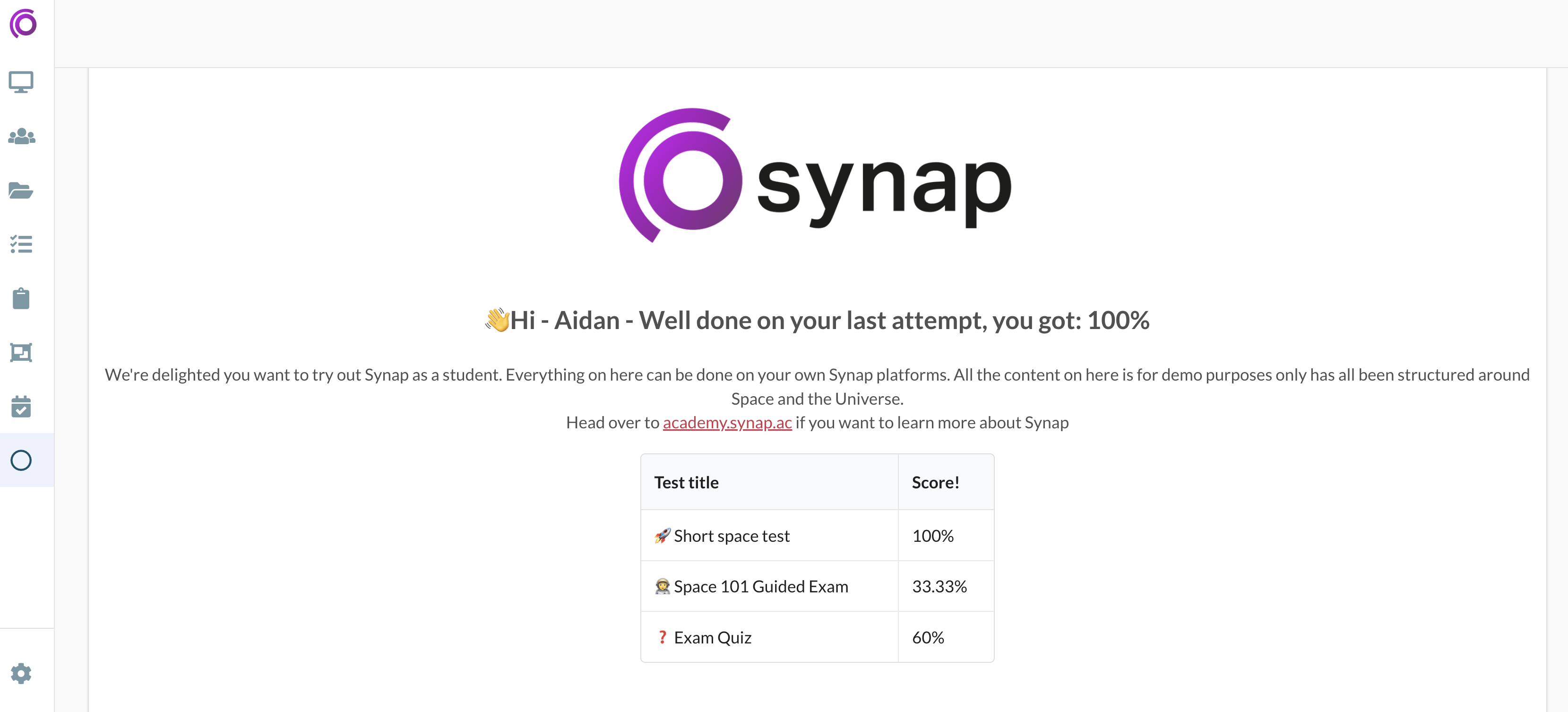
Below you'll find an example of what's possible with dynamic notes, here we are using one to welcome the student and through automations and user attributes we can display their last 3 scores!&#x20;

You can use dynamic portal variables and user attributes for personalisation, contextual links, and relevant information.

<figure><img src="/files/AVn0fG1zJNznQKMwIUFw" alt=""><figcaption><p>A dynamic note used as a homepage</p></figcaption></figure>

Below is breakdown of the available variables that can be used in a note:

| Variable name          | Description                                                                                                                                                 |
| ---------------------- | ----------------------------------------------------------------------------------------------------------------------------------------------------------- |
| User ID                | User id of the users account                                                                                                                                |
| User First Name        | First name from the name field of the users account                                                                                                         |
| User Last Name         | Last name from the name field of the users account                                                                                                          |
| User Full Name         | Full name from the name field of the users account                                                                                                          |
| User Email             | Email from the email field of the users account                                                                                                             |
| User Time Zone         | Time zone of the users account                                                                                                                              |
| User Locale            | Locale of the users account                                                                                                                                 |
| User Token             | Current Token of the user viewing the note                                                                                                                  |
| User Subportal ID      | The Subportal ID of the user viewing the note                                                                                                               |
| Custom User Attributes | Any custom user attributes will be displayed in the list, these will populate with the data that has been set on the users account that is viewing the note |
| Portal ID              | Portal ID of your portal                                                                                                                                    |
| Portal Name            | Portal Name of your portal                                                                                                                                  |
| Portal URL             | URL of your portal                                                                                                                                          |

Using logic operators allows you to take user data, check and perform various operations depending on truthy falsey values or matching values.

Below is a list of the Logic operators available to use in a note:

<table><thead><tr><th width="161">Logic operator</th><th width="251">Behaviour on a dynamic note</th><th>Syntax</th></tr></thead><tbody><tr><td>if</td><td>If condition A is true, execute block A.</td><td><pre data-overflow="wrap"><code>{{#if user.firstName ""}}  Hi {{user.firstName}}
</code></pre></td></tr><tr><td>if/else</td><td>If condition A is true, execute block A. Else, execute block B.</td><td><pre data-overflow="wrap"><code>{{#if user.firstName ""}}  Hi {{user.firstName}} {{else}} Who are you? {{/if}}
</code></pre></td></tr><tr><td>if/elseIf/else</td><td>If condition A is true, execute block A. Else If condition B is true, execute block B. Else If condition C is true, execute block C. If no conditions are true, execute the else block.</td><td><pre data-overflow="wrap"><code>{{#if  user.firstName ""}} Hi {{user.firstName}} {{else if user.email ""}} Hi {{user.email}}  {{else}} Hi there! {{/if}}
</code></pre></td></tr><tr><td>unless</td><td>Unless condition A is true, execute block A.</td><td><pre data-overflow="wrap"><code>{{#unless user.name "John"}} Weclome to the portal John! {{/unless}}
</code></pre></td></tr><tr><td>each</td><td>For each item in a collection, execute the block for that item.</td><td><pre data-overflow="wrap"><code>{{#each user.attr.subjects}} this.value {{/each}}
</code></pre></td></tr></tbody></table>


---

# Agent Instructions: Querying This Documentation

If you need additional information that is not directly available in this page, you can query the documentation dynamically by asking a question.

Perform an HTTP GET request on the current page URL with the `ask` query parameter:

```
GET https://academy.synap.ac/doc/portal-settings/content-management/notes/dynamic-notes.md?ask=<question>
```

The question should be specific, self-contained, and written in natural language.
The response will contain a direct answer to the question and relevant excerpts and sources from the documentation.

Use this mechanism when the answer is not explicitly present in the current page, you need clarification or additional context, or you want to retrieve related documentation sections.