> For the complete documentation index, see [llms.txt](https://academy.synap.ac/doc/llms.txt). Markdown versions of documentation pages are available by appending `.md` to page URLs; this page is available as [Markdown](https://academy.synap.ac/doc/exams/remote-exam-planning-guide.md).
# Remote Exam Planning Guide
Delivering a smooth exam experience starts well before exam day.
This guide is designed to help you think through the practical decisions involved in running an exam on Synap. Whether this is your first online exam or you’re refining an existing process, taking time to plan properly will reduce stress for both your team and your candidates.
1. **Getting your questions and content ready**
2. **Marking requirements**
3. **Candidate access & user creation**
4. **System checks**
5. **Previewing & QA**
6. **Security and proctoring**
7. **Exam windows and results**
8. **Communications**
9. **Exam day support**
### **1. Getting your questions and content ready**
If you’re moving from paper to online delivery, it’s worth reviewing your content carefully.
Online exams behave differently from paper exams. Small wording changes can make a big difference to clarity.
You may want to check:
* Do any questions say “circle the correct answer” or similar?
* Are diagrams and tables clearly readable on screen?
* Does the layout work well on a laptop display?
* Have you selected the most appropriate question types?
Synap supports a range of question types, including multiple choice, extended response, short answer, numeric entry and file upload. It’s also worth considering whether you’d benefit from features such as question randomisation, shuffling or question banks.
Taking time to review wording and structure early avoids confusion later. Below are some helpful documents to help with setting up your questions.
{% content-ref url="/pages/-MkhEVp7teldVVDsim\_C" %}
[Question types](/doc/quizzes/creating-a-quiz/question-types.md)
{% endcontent-ref %}
{% content-ref url="/pages/-Mkl2YdAoZ2RjZZjc8uF" %}
[Importing & Exporting Questions](/doc/quizzes/importing-and-exporting.md)
{% endcontent-ref %}
### 2. Marking requirements
If your exam is fully auto-marked, setup is relatively straightforward.
If you have manually marked questions, it’s helpful to decide in advance:
* Who will complete marking?
* Do you need blind marking?
* Will you use moderation or escalation?
* When will marking take place?
* When will results be released?
Mapping this out ahead of time ensures your marking process runs smoothly once candidates have submitted.
{% content-ref url="/pages/HnfG2Nre6YbrhYaIHBar" %}
[Moderator only marking - Simple marking](/doc/exams/create-and-manage-exams/marking/moderator-only-marking-simple-marking.md)
{% endcontent-ref %}
{% content-ref url="/pages/uweQ9G8PGBl5gp7XA77k" %}
[Adding custom marks and a rubric to questions](/doc/exams/create-and-manage-exams/marking/adding-custom-marks-and-a-rubric-to-questions.md)
{% endcontent-ref %}
### 3. **Candidate access & user creation**
One of the most common sources of exam-day issues is login confusion. A clear plan here makes a big difference.
You can either:
* Invite users via email from Synap (they create their own password), or
* Generate individual or bulk users, choosing whether to distribute credentials yourself, or allow the platform to guide them
{% content-ref url="/pages/A0mi2TN377qTUXoC3Lv6" %}
[Users & Groups](/doc/users-and-groups/user-types.md)
{% endcontent-ref %}
{% content-ref url="/pages/taVtyDSNHj2hS01H2eGg" %}
[Generating user accounts](/doc/users-and-groups/creating-groups/generating-user-accounts.md)
{% endcontent-ref %}
You should also consider:
* What sort of user groups you need or if you're using direct exam registration instead
* How candidates will receive login details
* Who will handle password reset queries
* Whether you need to store additional information (e.g. candidate ID, cohort, centre number)
Clear communication here reduces support demand significantly.
### 4. System checks
We strongly recommend running a system check before your live exam.
You can use our template system check questions to get started: [CSV template](https://synap-content.s3.eu-west-1.amazonaws.com/Templates/System+Check+Example+-+System+Check.csv)
A system check should mirror your real exam as closely as possible — including question types, timing and any proctoring settings.
Encourage candidates to complete this using:
* The same device
* The same network
* The same location
This helps identify technical issues early and reduces stress on exam day.
We have created a dedicated candidate help space on our website which you can share with candidates or IT teams for extra support in getting set up for their exams:
### 5. Previewing and QA
Once an exam is active, changes cannot be made. Because of this, preview and testing are essential.
Before publishing:
* Preview every question
* Check formatting and images
* Confirm answer keys
* Review timing and result settings
A common best practice is to:
1. Assign the exam to an internal QA group
2. Complete a full test attempt
3. Review results and reporting
4. Clone the exam
5. Assign the cloned version to real candidates
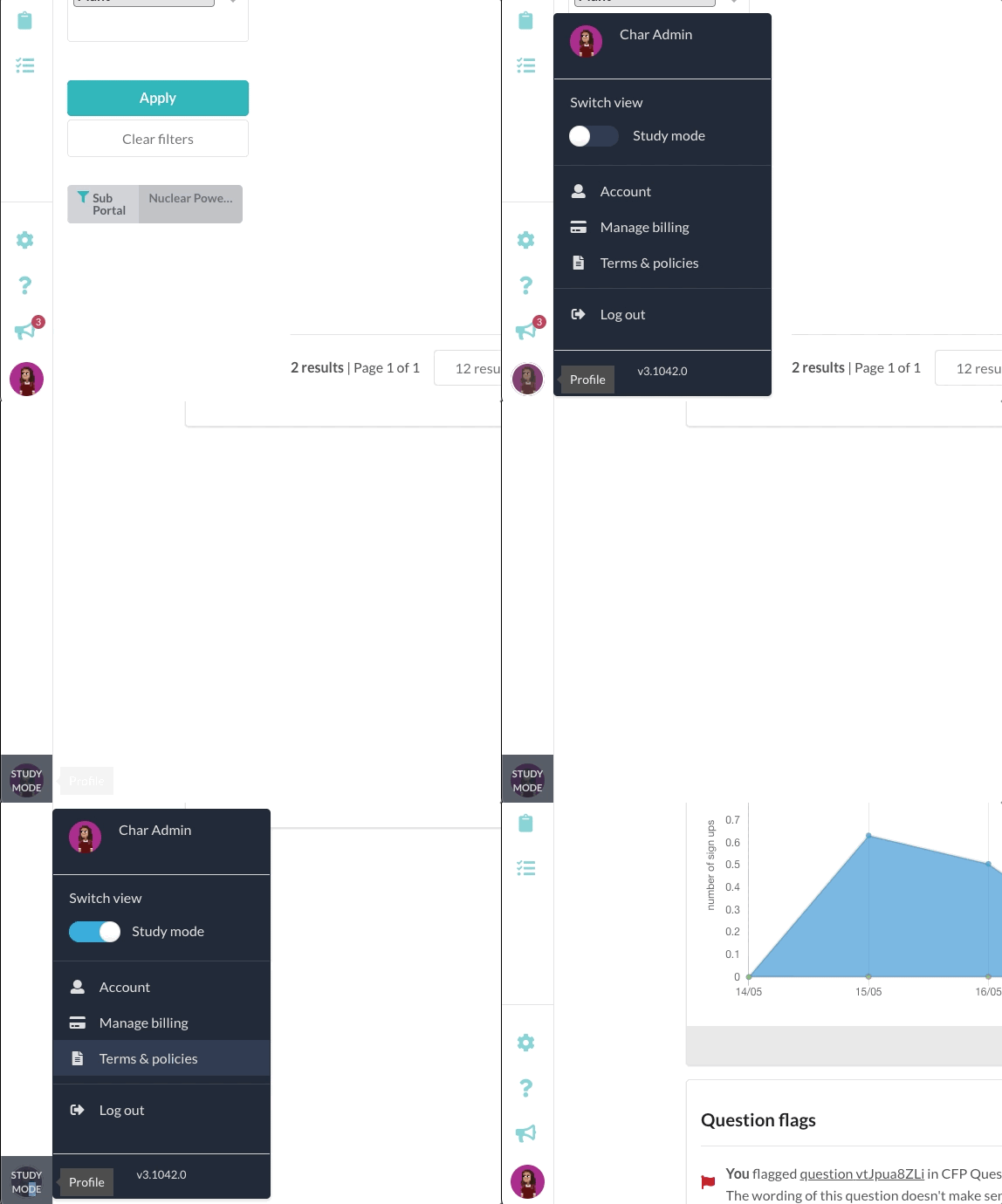
Admin attempts are not charged, so use them as part of your QA process. You can also go into study mode at any time to view the platform as a student user.
Toggling study mode
### 6. Security and proctoring
Synap offers a range of security features, including:
* Locking exams to prevent tab switching
* Passcode protection (useful for in-person exams)
* Question and option shuffling
* Dynamic exams
* Synoptic proctoring
* Live proctoring
* AI Review
* Desktop Lockdown
If you are using proctoring, remember that higher security settings increase technical requirements. Candidates may need to enable camera and microphone permissions, adjust browser settings, or install additional software.
**If candidates are using institutional or managed devices, it may be necessary to involve IT teams in advance.**
Clear communication about technical requirements prevents last-minute issues.
{% content-ref url="/pages/FU091z8rRVVPWqQRnVTp" %}
[Proctoring with Synoptic](/doc/exams/proctoring-with-synoptic.md)
{% endcontent-ref %}
{% content-ref url="/pages/n7OU7Sdq2VXAuJkB51JQ" %}
[4. Advanced : Exam Security](/doc/exams/create-and-manage-exams/4.-advanced-exam-security.md)
{% endcontent-ref %}
{% content-ref url="/pages/04Fp1LA3OG7QerIy9dbJ" %}
[Anti-Cheat features](/doc/exams/anti-cheat-features.md)
{% endcontent-ref %}
### **7. Exam windows and results**
We recommend providing a generous open window for candidates to start their exam. This is particularly important for proctored exams, where candidates may need additional setup time.
You may also wish to consider:
* Whether time extensions will be permitted
* How missed windows will be handled
* When results will be released
Many organisations set results to manual release and publish them in a single batch once marking is complete.
Planning this in advance helps manage candidate expectations.
{% content-ref url="/pages/ENYv5VreoRqsXwjkgRc3" %}
[Schedule](/doc/exams/create-and-manage-exams/5.-share/schedule.md)
{% endcontent-ref %}
{% content-ref url="/pages/zmNRQDlLaJOygUdF3gKz" %}
[Results](/doc/exams/create-and-manage-exams/3.-configure/results.md)
{% endcontent-ref %}
### 8. C**ommunications**
Automated emails can be helpful, but they can also cause confusion if exam details change.
A common best practice is to:
* Finalise and QA the exam
* Confirm dates and windows
* Then send communications manually or via bulk email
This gives you full control over the information candidates receive. You can also send additional custom messages from the exam attempt management table or user groups page
{% content-ref url="/pages/udUY2C1XoD5xhTt103lN" %}
[5. Share](/doc/exams/create-and-manage-exams/5.-share.md)
{% endcontent-ref %}
{% content-ref url="/pages/QaETZla02hHTj0bkLRML" %}
[6. Manage](/doc/exams/create-and-manage-exams/6.-manage.md)
{% endcontent-ref %}
### 9. Exam day support
Exams can be stressful for candidates, so it’s helpful to think about support in advance.
Synap does not provide direct candidate support unless agreed separately, so you should decide:
* Who will monitor candidate queries
* How candidates should get in touch
* What your escalation process looks like
To reduce support demand, consider:
* Running a system check
* Providing clear login instructions
* Using the pinned note feature to share FAQs, troubleshooting guidance and contact details
Example pinned note page can be found [here](https://academy.synap.ac/doc/exams/proctoring/proctoring-with-synoptic/synoptic-best-practices-and-trouble-shooting#pinned-faq-page) and viewed on our Universe portal when you sign up at [https://universe.synap.ac](https://universe.synap.ac/)
Learn more about custom pages and pinned FAQ notes below
{% content-ref url="/pages/uD8HUmarqLV1e2wkOCbF" %}
[Custom pages for FAQs and guides](/doc/exams/remote-exam-planning-guide/custom-pages-for-faqs-and-guides.md)
{% endcontent-ref %}
---
# Agent Instructions
This documentation is published with GitBook. GitBook is the documentation platform designed so that both humans and AI agents can read, navigate, and reason over technical content effectively. Learn more at gitbook.com.
## Querying This Documentation
If you need additional information that is not directly available in this page, you can query the documentation by asking a question.
Perform an HTTP GET request on the following URL with the `ask` and `goal` query parameters:
```
GET https://academy.synap.ac/doc/exams/remote-exam-planning-guide.md?ask=&goal=
```
`ask` is the immediate question: it should be specific, self-contained, and written in natural language.
`goal` is what the user is ultimately trying to achieve, the reason they need the answer. Sharing it helps GitBook give you a better, more relevant answer. A goal is most helpful when it describes the outcome the user wants rather than restating the question. For example, with `ask=how do I create an API token`, a goal like `automate deployments from our CI pipeline` lets GitBook tailor the answer to that use case.
The response will contain a direct answer to the question and relevant excerpts and sources from the documentation.
Use this mechanism when the answer is not explicitly present in the current page, you need clarification or additional context, or you want to retrieve related documentation sections.